
Revolutionizing the Shopping Experience

*Disclaimer: This project was for a school assignment and has not been implemented in the Puma app.
Introduction
Company:
Puma
Project Date:
June 2024
Tools Used:
Figma
My Role:
This project was created based on an instructor-guided UX Design course where I was responsible for the entire process from research and strategy to creation and prototyping.
Project Summary:
Puma, a leading global sports brand, aims to enhance its mobile app by integrating augmented reality (AR) features. The integration of AR into Puma’s app is expected to revolutionize how consumers interact with its products. For instance, potential buyers could use their smartphones to project how a pair of sneakers would look on their feet or how a piece of apparel would fit their body, all in real-time.
Goals and Objectives:
- Enhance User Experience: Create a seamless and engaging experience for users
- Increase Product Interaction: Allow users to interact with products in a virtual environment
- Boost Sales: Facilitate a more informed purchase decision, potentially increasing sales
- Strengthen Brand Loyalty: Offer unique and memorable AR experiences to build stronger connections with users
Challenge
Navigating Design Complexities and User Adaptation to Deliver Seamless AR Experiences
From a user experience perspective, the introduction of AR must be intuitive and non-disruptive, providing clear value without overwhelming users. Designing user-friendly interfaces and smooth transitions between AR and non-AR elements is crucial to ensure a seamless and enjoyable experience. By addressing these challenges with a user-centric approach, Puma can successfully integrate AR into its app, offering innovative experiences that resonate with its audience.
Solution
This project followed a standard 4-week timeline.
Week 1: Discover & Define
Week 2: Ideate
Week 3: Design
Week 4: Prototype
Week 1: Discover & Define
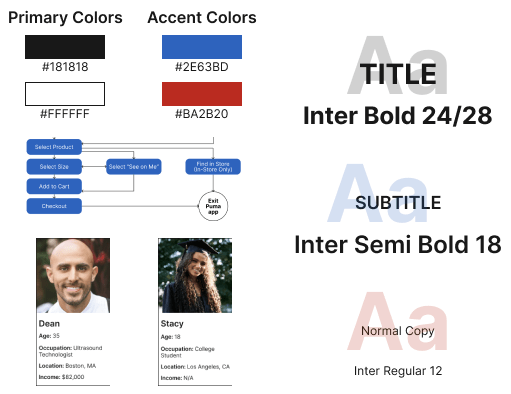
In the first week, the project focused on foundational research and defining the problem space for integrating AR into the Puma app. User research was conducted to understand the needs, preferences, and behaviors of Puma’s target audience. This data informed the creation of detailed user personas that represented the app’s primary users. A style guide was developed to ensure consistency and alignment with Puma’s brand identity throughout the project. A detailed task flow was created to map out the user’s journey through the AR features, highlighting touchpoints and interactions. Finally, a proposal outlining the objectives, scope, and potential impact of the AR integration was written.
Week 2: Ideate
Week 2 transitioned from research to ideation. The proposed additions to the app were visualized through sketches, which were used to explore different user interface layouts and AR interactions. From these sketches, high-fidelity wireframes were developed to represent the app’s structure and user flow. These wireframes served as a blueprint for the AR features, providing a visual representation of how users would navigate and interact with the new functionality.

Week 3: Design
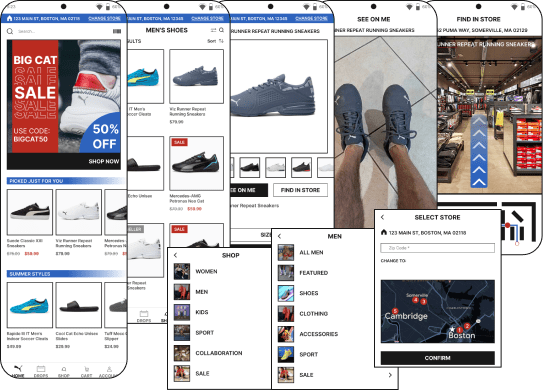
The third week was dedicated to transforming wireframes into detailed designs. An accessibility audit was performed to ensure that all aspects of the app would be usable and inclusive for all users, including those with disabilities and temporarily impaired. This involved evaluating the design for color contrast, text readability, and navigational simplicity. Based on the audit results, adjustments were made to enhance accessibility. Mockups were then created, bringing the wireframes to life with full visual detail, including colors, typography, and imagery consistent with Puma’s brand. These mockups provided a realistic preview of the app’s AR features and were crucial for stakeholder review and feedback.
Week 4: Prototype
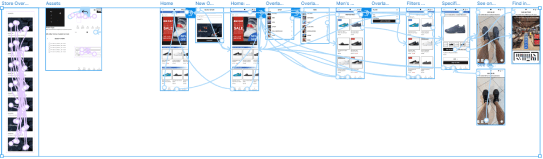
The final week of the project shifted focus to finalizing the designs and building interactive prototypes. The mockups, based on feedback, were adjusted and ensured that all elements were pixel-perfect. These finalized designs were then translated into interactive prototypes using Figma, allowing for realistic simulation of the AR interactions. The prototypes also provided a clear and detailed guide for developers to follow in the implementation phase.
The prototype can be seen and interacted with here.
 MatthewWarr.com