
Onboarding & Tutorial Experience
Introduction
Project Name:
Card Sharks
Project Date:
July – August 2024
Tools Used:
Adobe Firefly, Adobe Photoshop, Canva, and Figma
My Role:
This project was created based on an instructor-guided UX Design course where I was responsible for the entire process from research and strategy to creation and prototyping.
Objective:
Create a seamless onboarding experience for both experienced and inexperienced poker players. The aim is to provide a tailored experience that caters to the needs of both types of users, helping them quickly get acquainted with the app while ensuring they feel comfortable and confident.
Challenge
When designing a poker app like “Card Sharks”, the onboarding experience must cater to a diverse user base. Experienced poker players need quick access to games and minimal guidance, while inexperienced players require more education on game mechanics and strategies.
Research
User Surveys and Interviews: Conducted surveys and one-on-one interviews with both experienced and inexperienced poker players to understand their pain points, expectations, and preferences regarding onboarding and app navigation
Competitive Analysis: Analyzed popular poker apps like WSOP and Zynga Poker to identify common onboarding strategies and areas for improvement. Noted how these apps differentiate experiences for novice and seasoned players.
Onboarding Strategies
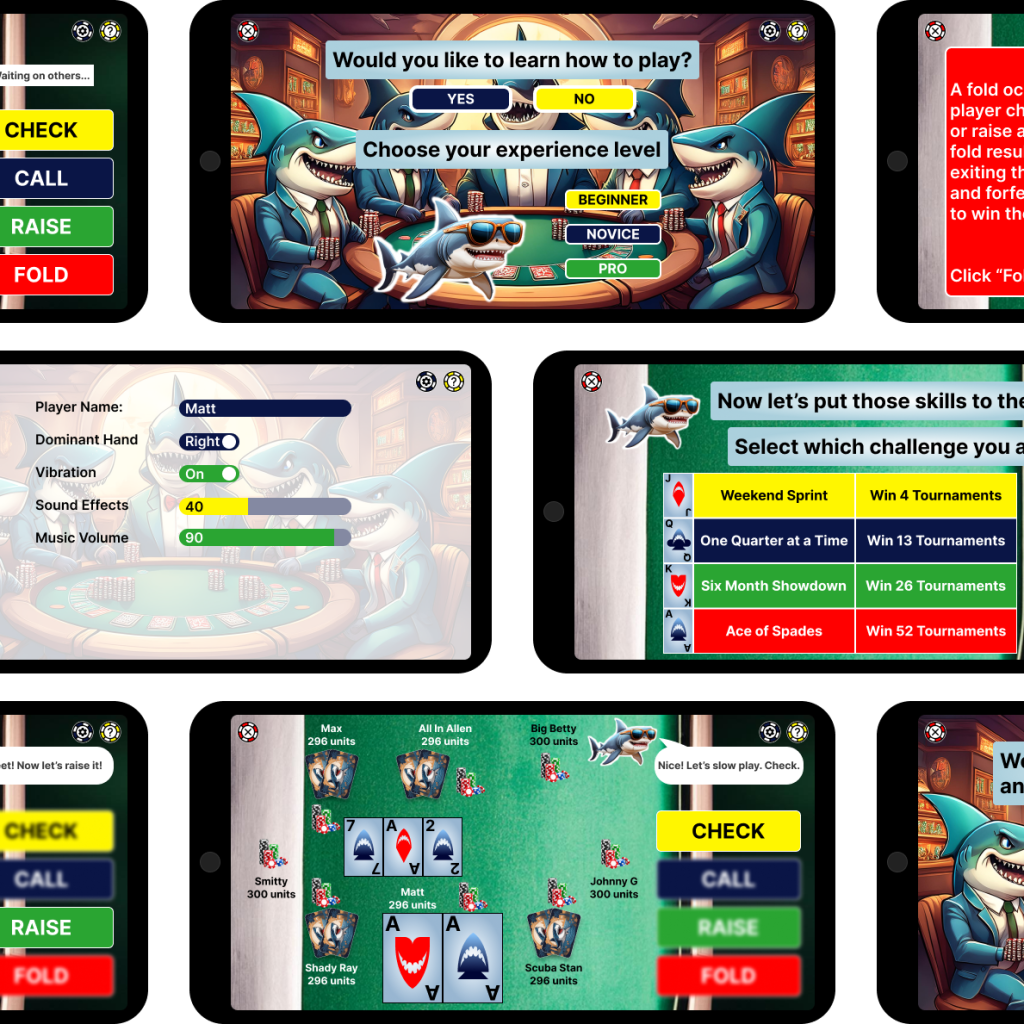
Personalized Onboarding Entry Point: Upon launching the app for the first time, users are prompted to choose their experience level.
Tailored Onboarding Journeys: Interactive tutorials introduce inexperienced players to the basics of common scenarios like checking, calling, raising, and folding. A practice hand allows the users to get a feel for the gameplay prior to entering a live hand.
Design and Prototyping
The design focuses on an intuitive interface including key design elements such as a clean and minimalistic interface and microinteractions. The UI used is easy for beginners to navigate and displays clear labeling and visual heirarchy. Through several rounds of user testing and iterations, multiple interaction styles were used including instant, smooth animated, and time triggered delays.

Accessibility plays a huge role when designing. The Stark plugin in Figma was used to test all visual simulations. Apart from that, all typography, contrast, and touch targets were tested and passed WCAG compliance. All touch targets coincide with AA standards, with most meeting AAA guidelines.

The prototype can be seen and interacted with here.

 MatthewWarr.com